

Checklist
What Counts as Proof of Recovery
Jan 14, 2026 · 8 min read
A green dashboard is a claim. Proof of recovery is an artifact trail: timestamps, operator steps, application validation, and a runbook that matches reality. This is the minimum bar.
The minimum bar for readiness
Recovery readiness is not a feeling and it is not a vendor badge. It is a set of artifacts that prove a system can be restored within the promised window, by the people who will actually be on call. If you can't show the evidence on one page, you do not have proof. You have hope.
The baseline standard is simple: restore, validate, document. Each step must produce evidence that can be reviewed later without oral history.
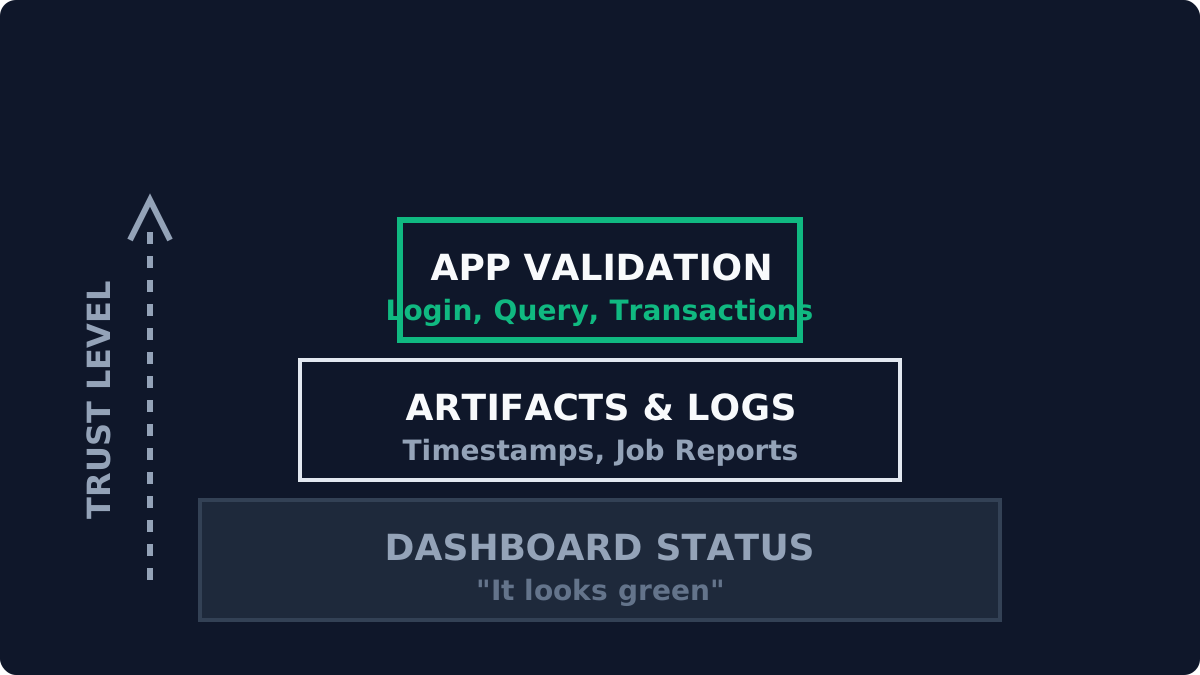
Acceptable evidence (artifact-centered)
This is the minimum evidence set for a single restore test. Anything less is a partial exercise.
- Timing data. Start and end timestamps for each phase: restore start, data ready, system boot, application ready, validation complete. These should map directly to RTO and be captured from system logs and operator notes.
- Operator confirmation steps. Named operator, role, and step-by-step actions. The person who runs the test should be identified, not just the automation account. This proves the runbook is executable by humans.
- Application-level validation. A working OS is not recovery. Confirm the application behaves as expected: login, a known query, a transaction, a report render, or an API call with a known-good response.
- Data integrity checks. Validate data freshness and integrity. At minimum: last successful transaction timestamp and one integrity signal (checksum, row count, or domain-specific health check).
- Runbook reference. The exact runbook version used, with any deviations noted. If the runbook is out of date, that is a finding, not a footnote.
- Evidence artifacts. Screenshots, log excerpts, and command output attached to the restore report. Artifacts should allow an auditor to replay the outcome without a meeting.
What does not count (common misconceptions)
- "Backups are green." A successful backup job is not a restore. It is a data capture event, not proof of recovery.
- "Replication is healthy." Replication health does not validate bootability or application readiness.
- "Snapshots exist." Snapshots are not restores. They can hide drift and amplify risk if relied on as a recovery plan.
- "We did a DR test last year." A test outside the current platform version, configuration, or staffing model is historical, not current evidence.
Operator confirmation: required, not optional
Automation is useful, but humans still execute the recovery path when production is on fire. Every test should include explicit operator confirmation: who ran it, which steps were manual, and what dependencies were required (credentials, firewall rules, storage access, DNS overrides). If those dependencies are not proven during the test, they are unproven during a real event.
Application validation: the only thing that matters
Recovery is not a boot. It is a working system. A valid test must show that the application is functional for a defined user path. This can be minimal, but it must be real. Examples:
- Log in with a non-admin account and complete a key workflow.
- Run a known report and confirm output matches an expected range.
- Execute an API request and validate a canonical response.
Documentation standards (what the report must include)
A restore report should be a one-page artifact. The bar is whether someone outside the test team can read it and understand the result.
- Scope: system, version, and data set restored.
- RPO/RTO: target vs. achieved, with timestamps.
- Validation steps: what was tested and how.
- Findings: failures, surprises, or missing dependencies.
- Action list: what changes were made to runbooks or monitoring.
Evidence package example
If you keep this tight, it stays sustainable. A clean evidence package typically includes:
- Restore timeline. A single table: restore start, data ready, boot complete, validation complete, total duration.
- Validation artifacts. Screenshot or log excerpt showing the application-specific check passed.
- Operator notes. Any manual steps, friction, or assumptions that were required to succeed.
- Runbook delta. What changed, where, and who approved it.
Store the package in a predictable location with consistent naming. It should be easy to answer: "Show me the last three restore tests for system X," without hunting through email threads or chat logs.
Minimum cadence
The minimum cadence should track workload criticality. If cadence is too heavy, reduce scope, not proof.
- Tier 1: monthly restore with application validation.
- Tier 2: quarterly restore with application validation.
- Tier 3: semi-annual spot check or automated verification plus one annual restore.
Scope control keeps it repeatable
The way to keep this sustainable is to bound the test. Restore into an isolated network, keep dependencies explicit, and validate one real user path. Avoid expanding the test until the baseline is consistent. A small, repeatable test is a stronger signal than a large, heroic test that only happens once a year.
Why this standard matters
Evidence-based recovery removes ambiguity when you need clarity most. It turns recovery from a promise into a measured outcome. It also prevents drift: every test produces a small set of artifacts that expose what changed, what broke, and what still works. That is how resilience is built.
Minimum bar
Restore, validate, document.
If the proof can't fit on a page, the proof doesn't exist.
Related notes
All notesField Report
The Idempotency Audit: When Scripts Run Twice
Jan 17, 2026 · 6 min read
Why 'check-then-act' logic is fragile, and how a script that ran twice broke production.
Checklist
Azure Foundations: The Governance Baseline
Jan 17, 2026 · 5 min read
The boring but essential checklist that prevents Azure environments from rotting into ClickOps chaos.
Checklist
What Operators Actually Check on Monday Morning
Jan 14, 2026 · 7 min read
The minimal checks that prevent silent regression when the consultants are gone.
Next step
If this problem feels familiar, start with the Health Check.
It measures drift and recovery evidence, then returns a scored report with a focused remediation plan.